得分
24
Advertisement

C:\Users\kuba>netsh wlan show interfaces

There is 1 interface on the system:

    Name : Wireless Network Connection 2
    Description : DW1520 Wireless-N WLAN Half-Mini Card
    State : connected
    Network type : Infrastructure
    Radio type : 802.11g <-- the currently negotiated value
    Authentication : WPA-Personal
    Cipher : CCMP
    Connection mode : Auto Connect
    Channel : 11
    Receive rate (Mbps) : 54
    Transmit rate (Mbps) : 54
    Signal : 82%
    Profile : xxxx

    Hosted network status : Not started
解决方案找到了!
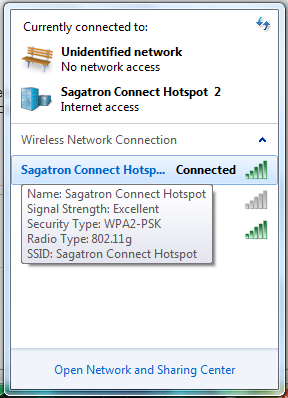
进入网络和共享中心,选择 “更改适配器设置"。右键点击你的无线适配器,然后点击 "状态"。它应该在那里的某个地方说你是否使用无线-N,无线-G等。
在Windows 7上,状态框似乎没有弹出,但如果你把鼠标放在连接链接上,会出现一个框,上面写着802.11n,如果你在n上。